Python quickstart
This page is an executable notebook: every cell below is re-run on each docs build, so the outputs are guaranteed to match the current release.
Beams
A Beam is a 2D elliptical Gaussian in FITS conventions:
FWHM major/minor axes in degrees, position angle in degrees East of North.
from convolve_rs import Beam

beam = Beam.from_arcsec(20.0, 10.0, 45.0)
print(beam)
BMAJ=20.0000" BMIN=10.0000" BPA=45.00°
Beam convolution and deconvolution follow the standard Gaussian algebra (see Algorithm background):
a = Beam.from_arcsec(3.0, 3.0, 0.0)
b = Beam.from_arcsec(4.0, 4.0, 0.0)

c = a.convolve(b)
print(f"convolved:    {c}")
print(f"deconvolved:  {c.deconvolve(a)}")
convolved:    BMAJ=5.0000" BMIN=5.0000" BPA=0.00°
deconvolved:  BMAJ=4.0000" BMIN=4.0000" BPA=0.00°
Deconvolving a beam that is too small raises a ValueError:
b.deconvolve(c)
---------------------------------------------------------------------------
ValueError                                Traceback (most recent call last)
Cell In[3], line 1
----> 1 b.deconvolve(c)

ValueError: beam could not be deconvolved: source beam is smaller than the PSF
Common beam
common_beam() finds the smallest beam that a whole set of
beams (e.g. the channels of a cube) can be convolved to:
from convolve_rs import common_beam

beams = [
    Beam.from_arcsec(10.0, 8.0, 30.0),
    Beam.from_arcsec(12.0, 6.0, 60.0),
    Beam.from_arcsec(11.0, 7.0, -40.0),
]
target = common_beam(beams)
print(target)
BMAJ=12.1662" BMIN=10.7775" BPA=-102.48°
Smoothing an image
smooth() convolves an image from one beam to another in the
UV plane and applies the flux scaling appropriate for its brightness unit.
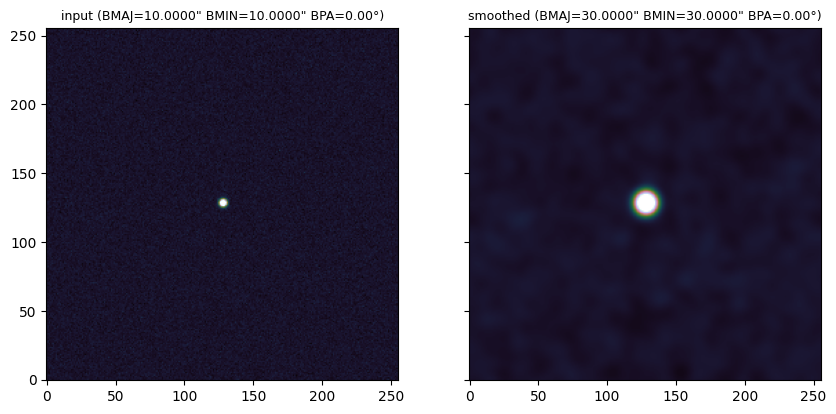
Here we build a synthetic image: a point source restored with a 10″ beam, plus
noise.
import numpy as np

rng = np.random.default_rng(42)

n = 256
dx_deg = 2.5 / 3600.0  # 2.5 arcsec pixels

old_beam = Beam.from_arcsec(10.0, 10.0, 0.0)
new_beam = Beam.from_arcsec(30.0, 30.0, 0.0)

# Restored point source: a Gaussian with the old beam's FWHM.
y, x = np.mgrid[:n, :n] - n / 2
sigma_pix = (old_beam.major_arcsec / 2.5) / (2 * np.sqrt(2 * np.log(2)))
image = np.exp(-(x**2 + y**2) / (2 * sigma_pix**2)).astype(np.float32)
image += rng.normal(0, 0.01, (n, n)).astype(np.float32)
from convolve_rs import smooth

smoothed = smooth(image, old_beam, new_beam, dx_deg, dx_deg, bunit="Jy/beam")
For a Jy/beam image, the peak of an unresolved source stays (close to) constant under convolution — the flux scaling compensates the smearing:
print(f"input peak:    {image.max():.3f} Jy/beam")
print(f"smoothed peak: {smoothed.max():.3f} Jy/beam")
input peak:    1.004 Jy/beam
smoothed peak: 1.007 Jy/beam
import matplotlib.pyplot as plt

fig, axs = plt.subplots(1, 2, figsize=(10, 5), sharex=True, sharey=True)
for ax, (data, title) in zip(
    axs,
    [(image, f"input ({old_beam})"), (smoothed, f"smoothed ({new_beam})")],
):
    ax.imshow(data, origin="lower", vmin=-0.05, vmax=0.5, cmap="cubehelix")
    ax.set_title(title, fontsize=9)
plt.show()
NaN handling
NaN pixels propagate through the convolution rather than poisoning the whole image:
image_nan = image.copy()
image_nan[100:120, 100:120] = np.nan

smoothed_nan = smooth(image_nan, old_beam, new_beam, dx_deg, dx_deg, bunit="Jy/beam")
print(f"NaN pixels in: {np.isnan(image_nan).sum()}, out: {np.isnan(smoothed_nan).sum()}")
NaN pixels in: 400, out: 484
Working with FITS files
With astropy, reading the beam from a header and writing the smoothed image back looks like:
from astropy.io import fits
from convolve_rs import Beam, smooth

with fits.open("image.fits") as hdul:
    header = hdul[0].header
    data = hdul[0].data.squeeze().astype("float32")

    current = Beam.from_fits_header(header)
    target = Beam.from_arcsec(30.0, 30.0, 0.0)
    smoothed = smooth(
        data, current, target,
        header["CDELT1"], header["CDELT2"],
        bunit=header.get("BUNIT"),
    )

    header["BMAJ"], header["BMIN"], header["BPA"] = (
        target.major_deg, target.minor_deg, target.pa_deg,
    )
    fits.writeto("smoothed.fits", smoothed, header, overwrite=True)
For batch processing of many images or large cubes, prefer the
convolvers CLI — it parallelises across images/channels and
handles beamlogs and CASA multi-beam tables.